From 1,063 to 224: why most VCF 9.1 flows never need a firewall rule
The Broadcom ports catalogue lists every port for every product. It is not a firewall design. Here is how a 12-step assessment cut one customer's candidate rules by 79%, with a reason recorded for every exclusion.
Every VCF engagement reaches the same moment. The network and security teams ask for the firewall rules, and someone exports the full list from ports.vmware.com. The list is accurate. It is also unusable as a change request.
The catalogue is a complete list of every port for every VCF product. That is exactly what a reference should be. A firewall design is something else: the subset of flows that actually cross a firewall in this design, for the products and features this customer runs.
The numbers from a real assessment
We ran the ACME assessment through the VCF Firewall Planner. ACME uses network Model 2, a dedicated management subnet.
| Stage | Rules |
|---|---|
| Candidate rules (catalogue split per domain, plus AI-suggested egress) | 1,063 |
| Guided steps applied | 12 |
| Consolidated rules ACME actually opens | 224 |
That is a 79% reduction, and every one of the 559 excluded rules carries a reason the firewall team can review.
Why the raw rule set is hard to use
Each of these is a problem we hit on real engagements:
- No mapping to the design. Rules list products and ports, not the VLANs and subnets in your design.
- Everything is in scope. Every product, add-on, shared service and feature appears, deployed or not.
- Rules off the firewall. Flows between VLANs routed on the ToR never reach a firewall.
- Rules in the same VLAN. Layer 2 traffic is listed as if it needs a firewall rule.
- Internet URLs missing. Depot, licensing and HCL URLs live in KB articles and TechDocs, and they change.
- Sprawl with no audit trail. One line per port, and no record of why a rule was dropped.
Where the reduction comes from
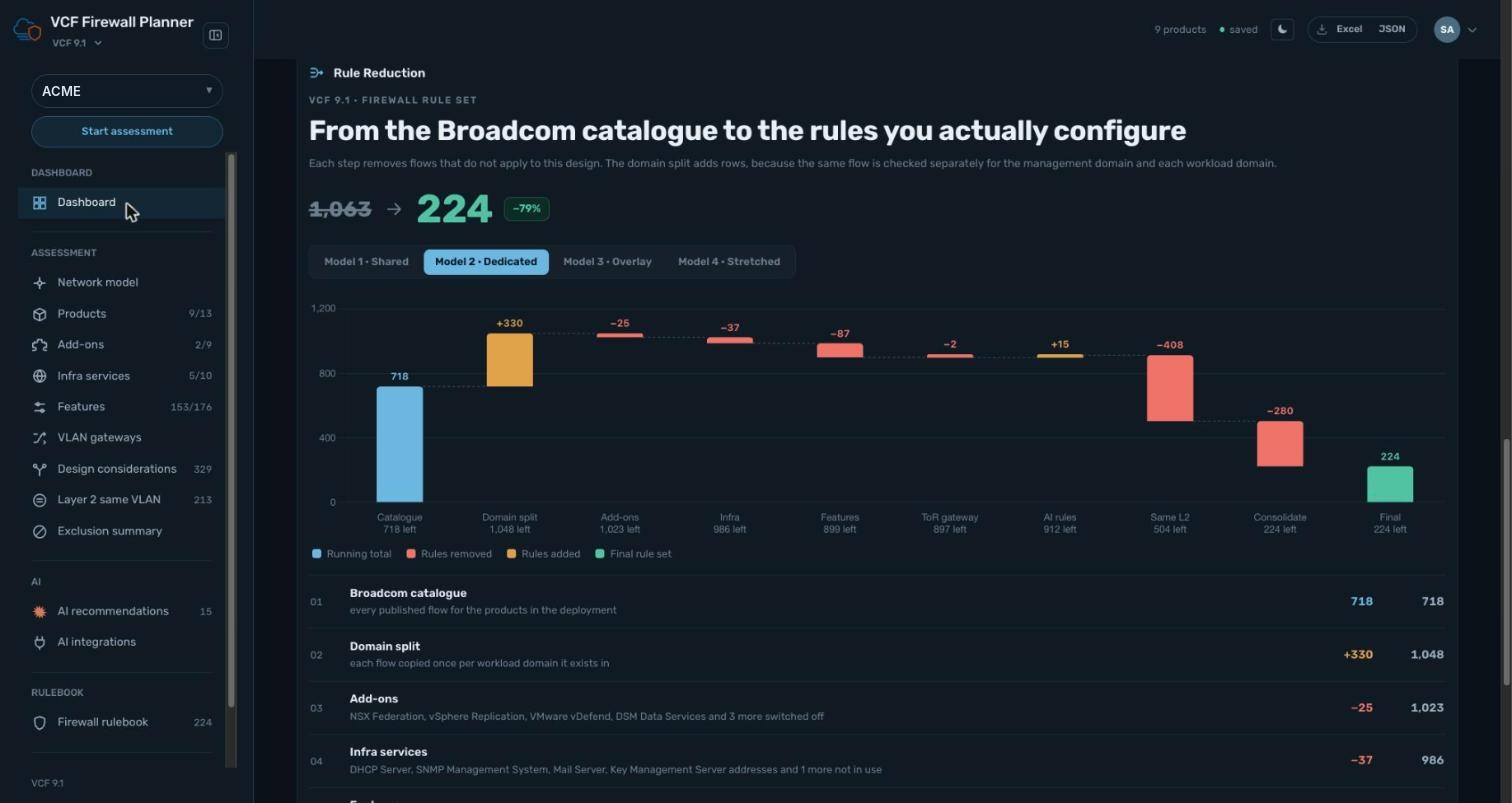
Rules remaining after each step for ACME:
| Step | Rules remaining | Change |
|---|---|---|
| Catalogue | 718 | |
| Domain split | 1,048 | +330 |
| Add-ons | 1,023 | −25 |
| Infra services | 986 | −37 |
| Features | 899 | −87 |
| ToR gateway | 897 | −2 |
| AI egress rules | 912 | +15 |
| Same L2 | 504 | −408 |
| Consolidate | 224 | −280 |
Two steps do most of the work. Removing Layer 2 same-VLAN flows takes out 408 rules, and consolidation removes 280 more. The domain split is the one step that adds rows, because the catalogue's flows are split out per domain before anything is removed.
The 12 steps
- Customer: name the assessment so every decision is recorded per engagement.
- Network model: pick one of four VCF network models.
- Products: select the VCF products in scope.
- Add-ons: switch on only the add-ons actually deployed.
- Infra services: choose the shared services in use.
- Purpose and feature: turn off unused features.
- VLAN gateways: mark each VLAN as routed on the ToR or the firewall.
- Consolidate: merge per-port lines into one rule per flow.
- AI egress: add internet egress found in Broadcom KBs and TechDocs.
- Design considerations: workload domain, overlay, peering and depot choices.
- Layer 2 same VLAN: drop flows that never leave a VLAN.
- Exclusion summary: review every exclusion before publishing.
What the firewall team receives
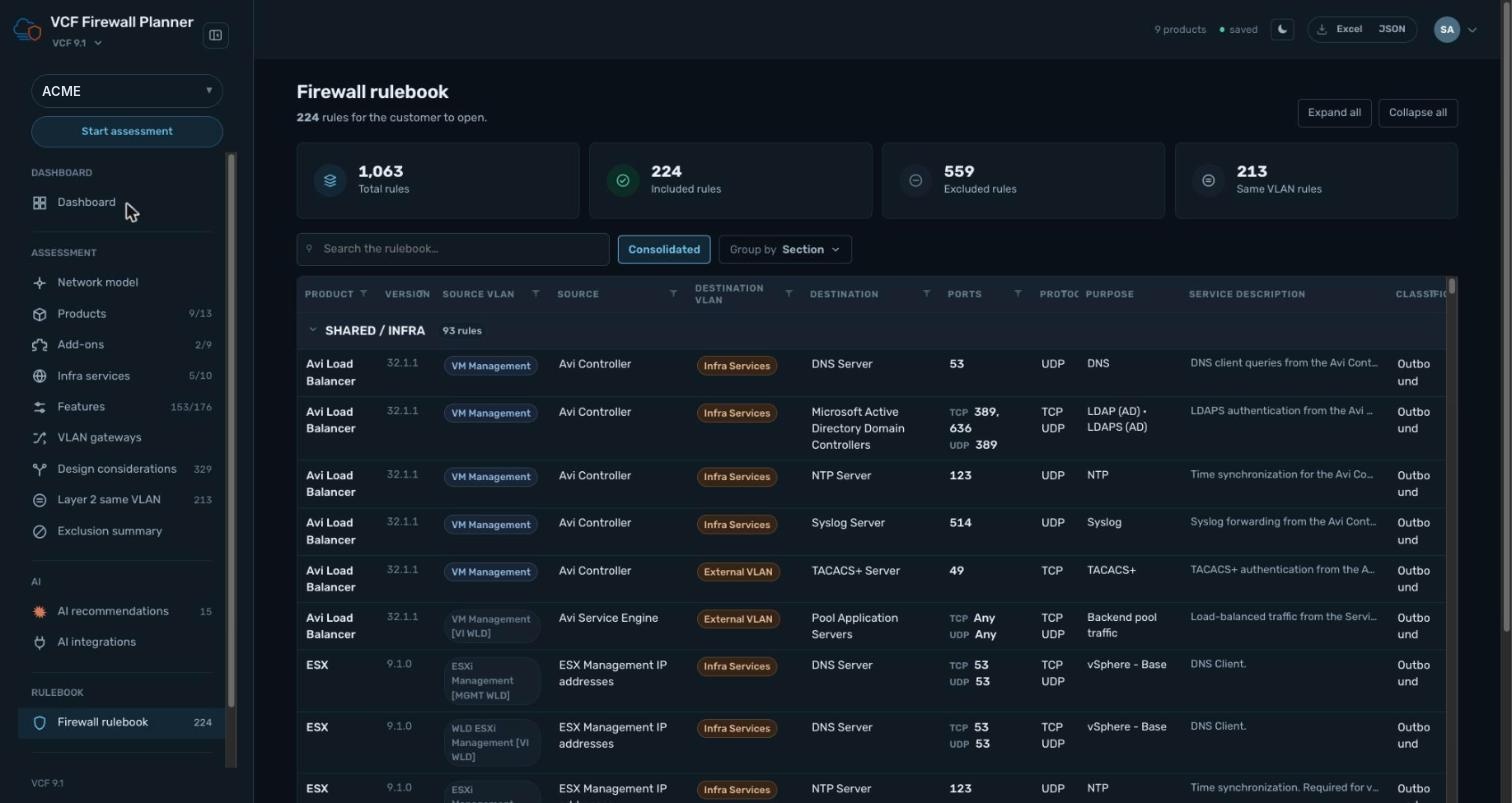
The output is a rulebook of 224 rules, grouped by section starting with SHARED / INFRA, with source and destination VLAN, ports, protocol and purpose for each. It exports to Excel or JSON. Alongside it sits the exclusion summary, so a reviewer can see why each of the other 559 flows was left out, not just that it was.
Want to run it on your own design? Start at the VCF Firewall Planner.